Silviu-Marius Ardelean's Blog

a software developer web log

Flexible changes for product version properties – Visual C++ binaries

Manually editing of binary files version in the resource editor of Visual Studio IDE is not a viable solution. If we have dozens of projects in our solution, then for each kit building we should need manual resources file edit. Otherwise, we can use a special tool that does this thing for us.
Unfortunately this approach is not the most flexible and could fail.

For our flexible binaries properties changes and in order to avoid manual edit for each rebuild we can create and include a header file (version.h) that contains some constants of product version and file version of our project (.rc files).

We have to include only these constants into this file (version.h):

    #define PRODUCT_VERSION      4.3.2.198
    #define PRODUCT_VERSION_STR  "4.3.2.198"

Then, for each .rc file wherever we have FileVersion and ProductVersion we have to use this constants.
When we will build a new kit, we have to change only these constants and then to start the kit building process. Everything is fine until we add new controls in our projects resource files. Then, because of Visual Studio IDE automation we can get an unlikely surprise: the FileVersion and the ProductVersion properties could be reset to 1.0.0.0.
In order to avoid this issue and edit the version only in a single place I propose the following workaround:

  • Create a version.h header file that have to contain these constants only (as on top). I should recommend to create it into the root solution in order of being easy included in all the projects.
  • Include this file in the project you need to use.
  • Use a text editor (ex. notepad.exe) and include next code section at the end of .rc2 resource file of your project (res\your_project.rc2) – this section contains the include version.h file section, too.
  • // Neutral resources
    #if !defined(AFX_RESOURCE_DLL) || defined(AFX_TARG_NEU)
    #ifdef _WIN32
    LANGUAGE LANG_NEUTRAL, SUBLANG_NEUTRAL
    #pragma code_page(1252)
    #endif //_WIN32
    
    /////////////////////////////////////////////////////////////////////////////
    //
    // Version
    //
    
    #include "..\version.h"
    
    VS_VERSION_INFO VERSIONINFO
     FILEVERSION PRODUCT_VERSION
     PRODUCTVERSION PRODUCT_VERSION
     FILEFLAGSMASK 0x3fL
    #ifdef _DEBUG
     FILEFLAGS 0x1L
    #else
     FILEFLAGS 0x0L
    #endif
     FILEOS 0x4L
     FILETYPE 0x1L
     FILESUBTYPE 0x0L
    BEGIN
        BLOCK "StringFileInfo"
        BEGIN
            BLOCK "040904e4"
            BEGIN
                VALUE "CompanyName", "TODO: <Company name>"
                VALUE "FileDescription", "TODO: <File description>"
                VALUE "FileVersion", PRODUCT_VERSION_STR
                VALUE "InternalName", "testResources.exe"
                VALUE "LegalCopyright", "TODO: (c) <Company name>.  All rights reserved."
                VALUE "OriginalFilename", "your_project.exe"
                VALUE "ProductName", "TODO: <Product name>"
                VALUE "ProductVersion", PRODUCT_VERSION_STR
            END
        END
        BLOCK "VarFileInfo"
        BEGIN
            VALUE "Translation", 0x409, 1252
        END
    END
    #endif    // Neutral resources
    /////////////////////////////////////////////////////////////////////////////
    
  • Edit “040904e4” block code with same data as if we should edit in a resources editor and use the version.h‘s file defined constants. As you can see in my example, for the FileVersion and ProductVersion properties I use my version.h constants. These properties will not be edited anymore.
  • Delete “// Version” section from default resource file your_project.rc (including comments – recommended).
  • Insert next lines into your_project.rc file after “3 TEXTINCLUDE BEGIN” and before “#define _AFX_NO_SPLITTER_RESOURCES\r\n“:
  •    "\r\n"
       "#include ""res\\your_project.rc2""\r\n"
       "\0"

    That code block looks like this:

    3 TEXTINCLUDE
    BEGIN
        "\r\n"
        "#include ""res\\your_project.rc2""\r\n"
        "\0"
        "#define _AFX_NO_SPLITTER_RESOURCES\r\n"
        "#define _AFX_NO_OLE_RESOURCES\r\n"
        "#define _AFX_NO_TRACKER_RESOURCES\r\n"
        "#define _AFX_NO_PROPERTY_RESOURCES\r\n"
        "\r\n"
        "#if !defined(AFX_RESOURCE_DLL) || defined(AFX_TARG_ENU)\r\n"
        "LANGUAGE 9, 1\r\n"
        "#pragma code_page(1252)\r\n"
        "#include ""res\\your_project.rc2""  // non-Microsoft Visual C++ edited resources\r\n"
        "#include ""afxres.rc""     // Standard components\r\n"
        "#endif\r\n"
        "\0"
    END
    

    Don’t forget to edit .rc2 file name with the right file name of your project.

  • In your_project.rc file the section “// Generated from the TEXTINCLUDE 3 resource.” have to contain only next declaration:
  • #include "res\your_project.rc2"

    The rest of the section’s lines have to be deleted.

  • We save both resources files: your_project.rc and your_project.rc2.
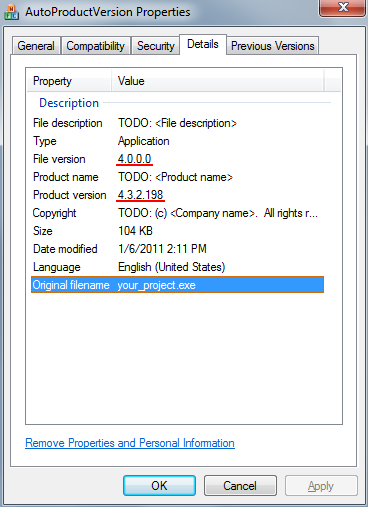
  • Rebuild the project and check the new generated binary properties. In the FileVersion we will have the major version (in my case 4.0.0.0) and in ProductVersion we have the current build version (4.3.2.198).
  • Observations
    Once you apply these steps, the product version properties will not possible from the Visual Studio IDE resource editor, anymore (only as edit text file or an external text editor). If we didn’t define something special in our project’s String Table we will see only IDS_ABOUTBOX.

    Demo application - AutoProductVersion (128)
    Share
    • Browse by Tags and Categories