
Ever connected to public Wi-Fi and been hit with a weird login page or a button that says “I accept the terms” before you can browse?That’s called a captive portal – a gatekeeper page that pops up when you connect to open networks in trains, hotels, cafés, airports, or universities. […]
Applications , C++ , C++ 11 , Hacking , Linux / Unix , Miscellaneous , Open-Source , Raspbian OS , Security , Software , STL , Tips and Tricks , Ubuntu , WinAPI , Windows
Posted on:
Process Status Analysis – the first steps
I am pleased to announce my first cross-platform and open source project, the Process Status Analysis tool, available on GitHub.
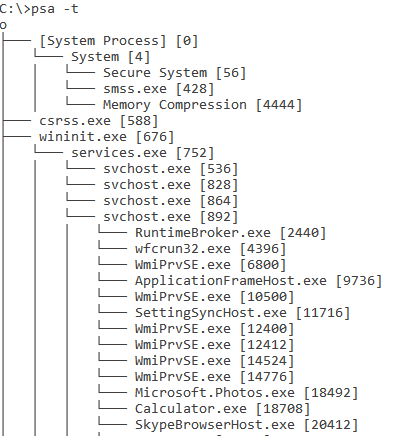
The Process Status Analysis (psa) is a command line tool that offer some Operating System processes analysis features:
– Get all processes loaded in memory information
– Get process only used memory
– Print processes tree
– Top most “expensive” processes
– Redirect output to a file
Linux / Unix , Other stuff , Tips and Tricks , Ubuntu
Posted on:
Ubuntu – How to fix update errors for a server behind of a proxy
If you’re behind of a proxy server and the IP address has changed (or proxy it’s a new node in your network topology) then probably when you’re trying to update your binaries then you’ll get a list of errors.
[bash]
W: Failed to fetch http://security.ubuntu.com/ubuntu/dists/oneiric-security/multiverse/i18n/Translation-en_US Unable to connect to 192.168.120.240:3128:
W: Failed to fetch http://security.ubuntu.com/ubuntu/dists/oneiric-security/multiverse/i18n/Translation-en Unable to connect to 192.168.120.240:3128:
[/bash]
This happens because you’re unable to connect to Ubuntu mirrors. In order to fix this issue you have to edit apt.conf file settings.
[bash]
root@my-server:~# vi /etc/apt/apt.conf
Acquire::http::Proxy “http://192.168.230.99:3128”;
[/bash]